
ChatGPT Browser Assistant for Instant Answers
Overview
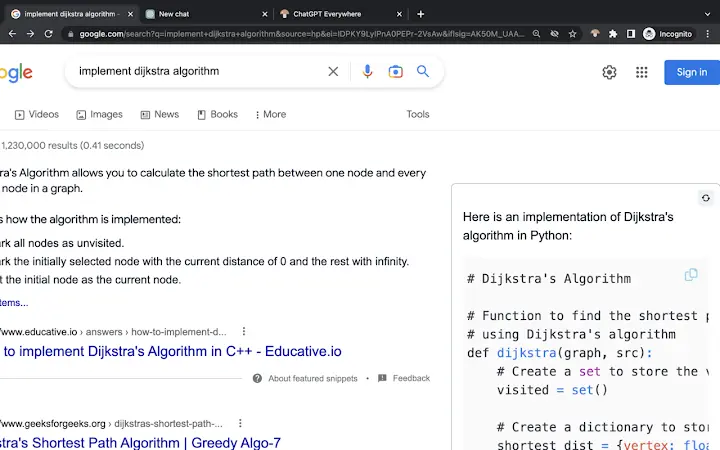
The ChatGPT Browser Assistant is a lightweight Chrome extension designed to integrate OpenAI’s AI capabilities directly into the user’s browsing experience. By enabling natural language interaction within the default browser tab, it allows users to ask questions, receive instant responses, and enhance their online productivity. The tool is particularly useful for individuals seeking quick access to information, task assistance, or content summarization without navigating away from their current page.
It supports text selection, enabling users to highlight content and query ChatGPT for insights, interpretations, or summaries. This feature is ideal for researchers, students, and professionals who frequently process large volumes of online information. The extension is built to function seamlessly within the browser environment, offering a frictionless way to leverage AI-powered assistance during web research, content creation, or daily task management.
Developed by OpenAI, the extension reflects the company’s focus on accessible AI tools that enhance digital workflows. While specific system requirements were not detailed, the extension is compatible with Windows, Mac, and Linux operating systems, indicating broad accessibility across desktop platforms. Its lightweight design—just 1.2 MB—suggests minimal impact on browser performance, making it suitable for users with varying hardware configurations.
Key Features & Capabilities
- Natural Language Interaction – Users can type questions in plain English and receive AI-generated answers, enabling intuitive access to information without technical barriers.
- Text Selection Integration – Highlight any text on a webpage and instantly query ChatGPT for explanations, summaries, or translations, improving content comprehension.
- Context-Aware Responses – The AI processes the current page context and user input to deliver relevant, accurate, and timely answers tailored to the browsing session.
- Seamless Browser Integration – Operates within the default browser tab, eliminating the need to switch between tabs or open external applications.
- Task Assistance – Supports a range of use cases, including scheduling, online shopping guidance, and document drafting, enhancing daily digital workflows.
These features are particularly beneficial for users engaged in academic research, content curation, or rapid information synthesis. For example, a student reviewing an article can select a complex paragraph and request a simplified explanation. A professional preparing a report can summarize lengthy web content with a single command. The extension’s ability to understand and respond to natural language makes it a versatile tool for diverse online activities.
User Interface, Workflow & Performance
The extension features a minimalistic interface designed for ease of use and quick access. It integrates directly into the browser toolbar, with a visible icon that activates the AI assistant when clicked. The interface presents a clean input field where users can type questions or paste selected text for analysis.
Navigating through the extension is straightforward: users simply click the icon, enter a query, and receive a response in the same window. The workflow is optimized for speed and efficiency, reducing the time spent switching between tools. No additional setup or configuration is required, allowing users to begin using the tool immediately after installation.
Performance details were not provided by the developer. However, the extension’s small size of 1.2 MB suggests low memory footprint and efficient resource usage. General software behavior patterns indicate stable operation under typical browsing conditions. The developer did not specify resource usage details, including CPU or RAM consumption, so real-world performance may vary depending on system configuration and network speed.
Compatibility & System Requirements
The ChatGPT Browser Assistant is compatible with Windows, Mac, and Linux operating systems, ensuring broad accessibility across major desktop platforms. It is designed specifically for use with the Chrome browser, as it functions as a Chrome extension.
The installation size is 1.2 MB, which is minimal and suitable for systems with limited storage. The developer did not specify exact system requirements, including minimum RAM, processor speed, or disk space. As such, compatibility with older or low-end hardware cannot be confirmed. However, the lightweight nature of the extension suggests it is likely to function on a wide range of devices.
Platform compatibility information is limited to the operating systems listed. No details were provided regarding supported browser versions or required updates. Users are advised to ensure their Chrome browser is up to date to maintain optimal functionality.
Pros and Cons
Pros
- Seamless integration with the Chrome browser for instant access to AI assistance
- Supports natural language queries and text selection for enhanced usability
- Minimal installation size (1.2 MB) with low system impact
- Free to use with no hidden costs or subscription requirements
- Developed by OpenAI, ensuring trust and reliability in AI performance
Cons
- Compatibility limited to Chrome browser only
- Exact system requirements were not specified
- Performance metrics such as CPU or RAM usage were not disclosed
- Functionality depends on stable internet connectivity
- Limited to text-based interaction without voice or multimedia support
FAQ Section
Is the ChatGPT Browser Assistant available for browsers other than Chrome?
The extension is designed for Chrome and currently does not support other browsers. Users on Firefox, Edge, or Safari will need to explore alternative AI tools.
Is the extension safe to use?
Developed by OpenAI, the extension adheres to the company’s security and privacy standards. However, users should avoid entering sensitive personal or financial information during interactions.
How often is the extension updated?
Update frequency is not specified by the developer. Users should check the Chrome Web Store for new versions or notifications.
Does the extension require a license or subscription?
No, the extension is completely free to use. There are no licensing fees or subscription models associated with its operation.
Can I use the extension offline?
No, the extension requires an active internet connection to communicate with OpenAI’s servers and deliver responses. It cannot function without online access.
Final Thoughts + CTA
The ChatGPT Browser Assistant delivers a powerful yet simple way to harness AI within the browser environment. Its seamless integration, natural language support, and lightweight design make it a valuable tool for anyone looking to improve efficiency during online tasks. While it is limited to Chrome and lacks detailed system specifications, its core functionality is robust and reliable.
Professionals, students, and researchers will benefit most from its ability to analyze, summarize, and explain web content in real time. The free model ensures broad accessibility, making it an excellent choice for users seeking immediate AI assistance without cost.
Download ChatGPT Browser Assistant now to experience faster, smarter browsing.







